Monday, May 28, 2012

RFID Garment Tracking at Disney

If you have a large inventory of garments that you need to track, take a look at the following ROI case:

  • Disney is using UHF RFID to track $100 million worth of costumes.
  • The solution has saved the company more than a million dollars.
  • Inventory counting times have been reduced from approximately 180 labor hours (within larger costume storage areas) to about two hours.
  • The system has increased the accuracy of inventory checks, from 85 to 90 percent accurate to nearly 100 percent.
  • The need to staff checkout counters has been eliminated, freeing up personnel for other tasks.

This is how it works. A Disney cast member walks through rows of costumes at one of the 25 storage areas. She selects her costume garments and proceeds to a kiosk with an integrated ThingMagic RFID reader. The cast member swipes her ID badge through a bar-code reader at the kiosk, where her face and name are displayed on a video screen. The RFID reader captures the ID numbers from the garments’ RFID Tag and feeds that information to the Disney garment management software. Voila -- Cinderella is off to greet her fans without a moment’s delay.

When the cast member is done for the day, she puts her costume into a laundry chute where another ThingMagic RFID reader captures the tag IDs. The status of the garments is updated, noting when they enter and exit the laundry area. This same process works with uniforms for band members, wait staff, etc.

Disney also uses RFID-enabled inventory cycle count carts to expedite inventory counts in their costume storage areas. What previously involved 15 to 20 employees manually scanning barcodes for nine to twelve hours can now be completed by one or two workers in about one hour.

The solution paid for itself in less than a year.

Friday, May 11, 2012

Frequently Asked Questions on Xerafy’s XS RFID Tag for Healthcare

Since the launch of the Xerafy XS RFID tag series, there have been many questions on the use of the tags in healthcare applications, where the size and ruggedness of the passive UHF RFID tags lends them especially well to surgical instrument tracking. Below is a list of the top XS tag questions since the tag was first unveiled.

Do XS RFID tags cause electromagnetic interference with hospital instruments?

Passive RFID tags do not emit any signal until activated by a reader, so emissions are quite low compared to active RFID for real-time locating systems. However, a study conducted in a non-clinical setting by the University of Amsterdam and published in the Journal of the American Medical Association found that passive RFID technology did generate some interference with medical devices when the RFID equipment was placed very close by. A follow-up study conducted by researchers from Indiana University and Purdue University found no such interference in tests conducted in an actual clinical setting. While the risk is quite low, hospitals should conduct a thorough EMI assessment to avoid any potential interference.

Can XS tags survive autoclave sterilization?

The tags are rugged and have been tested to withstand 1000 repeated autoclave sterilization cycles. The tags can withstand application temperatures between -40°F to +302°F (-40°C to +150°C). Surgical instruments can be tracked with through the sterilization process to certify cleanliness.

Is the a risk to the patient when using RFID tagged surgical instruments?

There is no risk to the patient safety in contact with RFID. The XS tags are biocompatible and materials meet non-toxic medical standards.

Are XS RFID tags FDA approved?

The XS Series is designed to comply with the most stringent FDA requirements for to CPG Sec. 400.210 for RFID use and ISO-10993 for Biocompatibility and FCC compliance to Part 15.231a.

What are some of the main applications for RFID in healthcare?

  • Asset location
  • UID unique identifier number for medical devices
  • Patient Tracking with wristbands
  • Baby Tracking with ankle bands
  • Surgical sponge tracking
  • Surgical tray tracking
  • Loss prevention
  • Office management
  • Patient record tracking
  • Surgical navigation in minimally evasive surgery
  • Laboratory specimen tracking

Does the size of an asset affect the read range of the XS tag?

The size of the asset is very important in determining which Xerafy metal RFID tag to use. The Dash XS should be used for assets with a width of less than 0.5 inches (15 mm). In addition, the length of the asset will also affect the tags read performance. For example, a tool that is 4 in (100 mm) length will have a significantly longer read range than a tool that is only 2 in (50 mm) in length.

How do I attach XS tags?

To properly attach the Dot-On XS and Dash-On XS, first use instant glue to place the tag on the asset, then cover the tag with epoxy resin to secure the tag in place. For assets in the medical field, we recommend using an FDA-approved USP Class VI epoxy. Using epoxy will both help secure the tag to the asset as well as help prevent damage from shock and impact. XS tags have horizontal polarization and should be attached to the asset lengthwise to maximize their performance.

How do I embed XS tags in a metallic asset?

First prepare a cavity in the asset where the tag will be placed. For the Dot-iN XS, prepare a circular cavity with a diameter of 0.39 in (10 mm) and a depth of 0.1 in (2.6 mm). For the Dash-iN XS, it is ideal to create cut away recess in the asset rather than a rectangular cavity. The length of the recess should measure 0.6 in (13 mm) and the depth should be less than 0.09 in (2.3 mm). Once the cavity or recess has been prepared, place the tag in the center of the cavity or recess using instant glue and then completely covering the tag with epoxy resin, making sure that all spaces are filled. Once again, it is important to ensure a flat metallic surface is used to eliminate any gap between the tag and the asset, which can lower the read range by detuning the tag.

Can XS tags be attached to sponges?

No, XS tags are designed for metallic assets and require a flat surface space of 0.24 x 0.08 in (6 x 2 mm) for the XS Dot and 0.59 x 0.12 x 0.06 in (15 x 3 x 1.5 mm) for XS Dash.

Monday, April 30, 2012

RFID Basics

If you have ever used an access card or fob to get into a building or passed through an automated toll collection system on a highway, you have used RFID. The definition of RFID is rather broad because it has so many uses. Let's first start with the acronym and what it means: RFID = Radio Frequency IDentification.

Now, let's break down what this means: a system of technologies that allows an object, person, or animal to wirelessly identify itself to another object or person. Hence the words RF (Radio Frequency) and ID (IDentification). To be able to do this in so many usage scenarios, form factors, price points, thermal environments, etc., the technology used for enabling RFID takes many forms. The most common ways of subdividing the technology are by frequency and whether or not the tag is a passive or active device. Let’s first look at the different frequencies. 

At the lowest common frequency or LF (Low Frequency), this spans the range of 58-148.5 kHz or 58-148.5 thousand cycles per second. This frequency's readers  have short read range (usually several centimeters), but most importantly, this frequency allows the RF waves to transmit through metals a few millimeters thick as well as liquids. These factors make LF technology very suitable for implanting into animals, but also for access control and electronic article surveillance (EAS) applications. LF is a passive technology in which the tags only respond when energized by an LF RFID Reader.  The behavior of the tag changes an incident RF field in a way that a reader can detect a unique ID. This ID may be a single bit in the case of an EAS tag or up to 10s of bits for animal tags.

The next frequency range spans from 1.75-13.56 MHz. This frequency range is called HF, or High Frequency, and includes tags for use in building access, public transportation, and electronic payment systems to name a few. The range of these systems is a few inches to a few feet, depending on the application. HF tags also work relatively well around metals and liquids. HF tags are usually used for proximity applications, for example, the gesture of moving one's phone or wallet is used to provide access or payment.

The next frequency range is UHF or Ultra High Frequency. UHF RFID spans the 433, 840-960 MHz and the 2.4 GHz range. At this frequency, the RF that is produced allows for relatively efficient wave-like propagation; similar to a radio station, but with reasonable amounts of power consumption for handhelds, laptops, trucks, printers, etc. UHF RFID tags contain a small silicon chip and an antenna paired onto or into an object. This allows one to create tags which can be read from inches to 10s of feet in a passive configuration, and 100s to 1000s of feet if used semi-passively (the tag still changes the RF that comes back to the reader rather than transmitting, but gets a battery to help it out) or actively (an active transmitter).

UHF RFID tags can also be produced relatively inexpensively; the antennas can be etched with chemicals or printed with a printer that can print metals such as copper or aluminum. The lower cost and long range of UHF RFID means that tags can be placed just about anywhere and interrogators (or RFID readers) can read them. This allows computers attached to these interrogators to see the world around them through the RF lens. 

To read more about the various differences within UHF tags, see our post on RFID Tag Basics.

Wednesday, April 18, 2012

Top 10 Benefits of IT Asset Management and Data Security with RFID

It’s no secret that RFID can enable real-time tracking of servers, tape media, hard drives, laptops and other IT assets better than any other method. However, some companies still think RFID technology is too expensive, unreliable, or large for their assets. Xerafy is determined to remove the barriers to RFID adoption by developing technology designed to maximize performance for IT asset tracking applications.

Recently, Xerafy announced the PicoX II Plus, Pico-On Plus, and Pico-iN Plus tags that achieve up to 10 feet read distance at half the size of current passive RFID-on-metal (ROM) RFID tags. Small ROM tags with high read range allow visibility on the smallest of assets and enable real-time tracking with faster and easier implementation methods than barcodes or active RFID technology.

Check out Xerafy's recent whitepaper on “Simplifying IT Asset Management and Data Security with RFID” that describe the standards set by the Financial Service Technology Consortium for IT asset management and examine the benefits for IT asset management with RFID.

Top 10 Benefits of RFID for IT Asset Management and Data Security:

1.  Increase visibility and operational efficiency of IT data center assets
2.  Improve IT staff productivity
3.  Increase overall utilization of IT assets
4.  Enable proactive protection against the loss of IT assets
5.  Protect data resident on those assets
6.  Enable cost-effective compliance with government and industry regulations
7.  Improve accountability for IT asset management
8.  Reduce capital equipment purchases
9.  Improve maintenance, repair, and overhaul process
10.  Save time and money with automatic inventory management

Saturday, March 31, 2012

Reading RFID Tags over TCP/IP Socket Using Speedway Connect Software

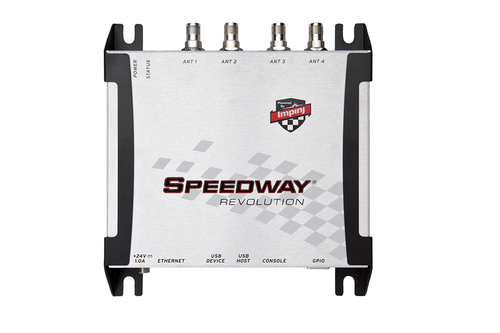
Speedway Connect software offers the ability to collect tag data from the Impinj Speedway Revolution RFID reader regardless of operating system or development platform.

By running Speedway Connect on the reader and configuring it to export tag reads over TCP/IP, any device which supports opening TCP/IP connections, or sockets, can import tag data.

Here is a video in which Speedway Connect software is configured to export tag data from the Speedway Revolution reader over a TCP/IP port. A simple Ruby script is then created to open a socket and import tag data.


Here is some C# sample code which would allow you to do the same in a .NET application: